最近玩微信小程序,上线需要启用https;于是只能配置SSL来启动https; 当然这里选择申请的是免费SSL:https://www.sslforfree.com 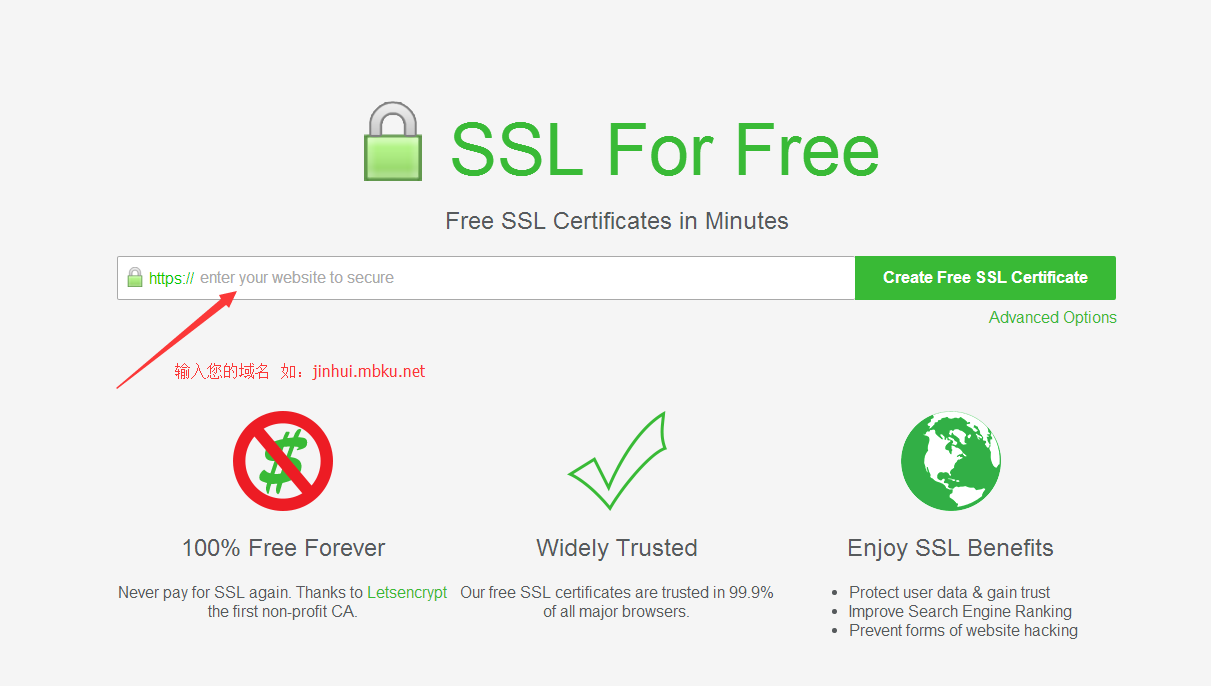 点击创建按钮,进入校验配置页面
 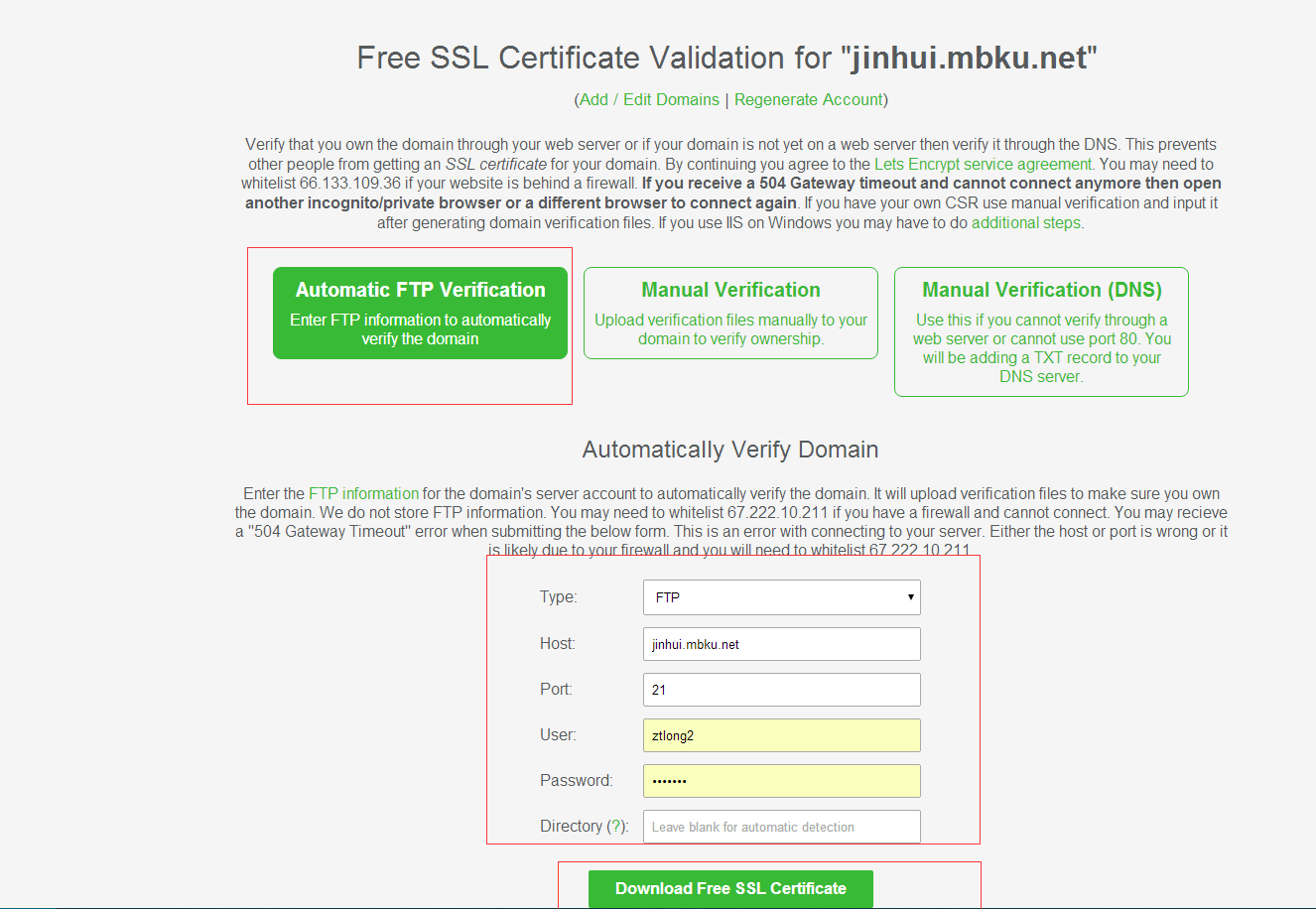 这里我选择的是FTP校验,配置好FTP信息,点击下载按钮 得到三个文件(ca\_bundle.crt(apache专有),certificate.crt,private.key) 我的是nginx的,所有只需要(certificate.crt,private.key),将这两个文件根据域名重命名方便多域名时区分(jinhui.mbku.net.crt,jinhui.mbku.net.key) 将重命名后的连个文件上传到服务器,我的目录(你自己定):/www/wdlinux/nginx-1.10.0/conf/cert/ 打开jinhui站点的nginx配置 新增:
 listen 443;ssl on;ssl_certificate /www/wdlinux/nginx-1.10.0/conf/cert/jinhui.mbku.net.crt;ssl_certificate_key /www/wdlinux/nginx-1.10.0/conf/cert/jinhui.mbku.net.key;ssl_prefer_server_ciphers on;ssl_session_timeout 10m;ssl_protocols TLSv1 TLSv1.1 TLSv1.2; 修改后: server {listen 80;listen 443;ssl on;ssl_certificate /www/wdlinux/nginx-1.10.0/conf/cert/jinhui.mbku.net.crt;ssl_certificate_key /www/wdlinux/nginx-1.10.0/conf/cert/jinhui.mbku.net.key;ssl_prefer_server_ciphers on;ssl_session_timeout 10m;ssl_protocols TLSv1 TLSv1.1 TLSv1.2;root /www/web/jinhui/public_html;server_name jinhui jinhui.mbku.net;index index.html index.php index.htm;error_page 400 /errpage/400.html;error_page 401 /errpage/401.html;error_page 403 /errpage/403.html;error_page 404 /errpage/404.html;error_page 405 /errpage/405.html;error_page 500 /errpage/500.html;error_page 503 /errpage/503.html;location ~ \.php$ {proxy_pass http://127.0.0.1:88;include naproxy.conf;}location ~ /\.ht {deny all;}location / {try_files $uri @apache;}location @apache {internal;proxy_pass http://127.0.0.1:88;include naproxy.conf;}} PS:假如你是Apache的服务器 参考如下: Listen 443LoadModule ssl_module modules/mod_ssl.so<virtualhost>DocumentRoot /www/web/jinhui/public_html/public SSLEngine onSSLProtocol all -SSLv2 -SSLv3SSLCertificateFile /www/wdlinux/httpd-2.4.18/conf/cert/jinhui.mbku.net.crtSSLCertificateKeyFile /www/wdlinux/httpd-2.4.18/conf/cert/jinhui.mbku.net.keySSLCertificateChainFile /www/wdlinux/httpd-2.4.18/conf/cert/bundle_jinhui.mbku.net.crt ServerName jinhuiServerAlias jinhui.mbku.netErrorDocument 400 /errpage/400.htmlErrorDocument 401 /errpage/401.htmlErrorDocument 403 /errpage/403.htmlErrorDocument 404 /errpage/404.htmlErrorDocument 405 /errpage/405.htmlErrorDocument 500 /errpage/500.htmlErrorDocument 503 /errpage/503.htmlphp_admin_value open_basedir /www/web/jinhui:/tmp<ifmodule mod_deflate.c="">DeflateCompressionLevel 7AddOutputFilterByType DEFLATE text/html text/plain text/xml application/x-httpd-phpAddOutputFilter DEFLATE css js html htm gif jpg png bmp php</ifmodule></virtualhost><directory>Options FollowSymLinksAllowOverride AllRequire all granted</directory>
二级域名配置SSL证书
2017-09-02
本文作者: 小罗同学
原文链接: 二级域名配置SSL证书
版权声明: 本站所有文章除特别声明外,均采用 BY-NC-SA 许可协议。转载请注明出处!
免责声明: 文中如涉及第三方资源,均来自互联网,仅供学习研究,禁止商业使用,如有侵权,联系我们24小时内删除!
评论1
暂时没有评论